Understanding Basic Networking in Cybersecurity
What I learned from a session by my senior Pragati Raj
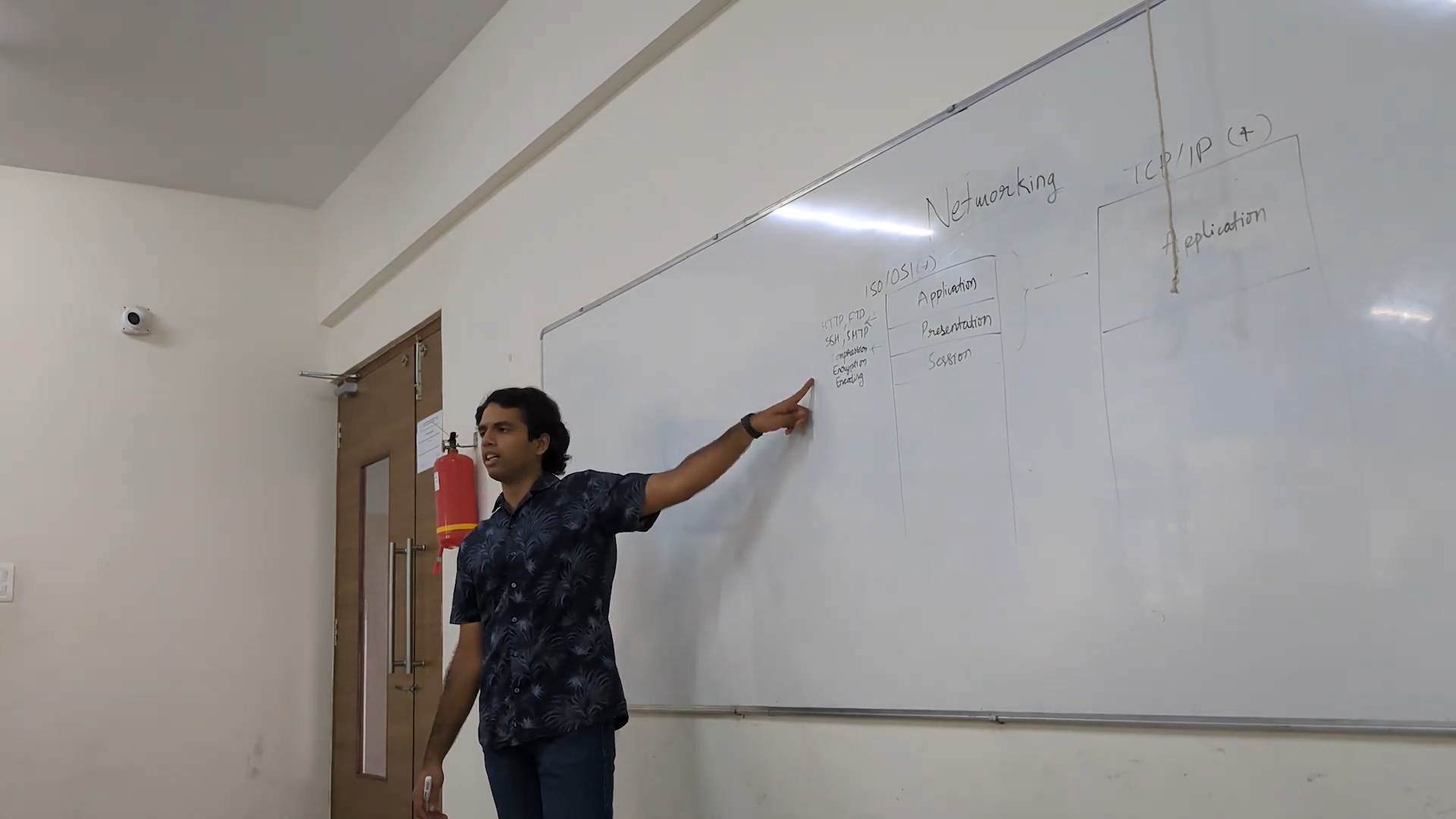
After the cryptography session, Pragati Raj moved on to another core subject: Networking.
He said something very simple but important. Networking is how systems communicate with each other.
At first, it sounded obvious. But as the session went deeper, I realized how many layers and concepts are involved just to send a simple message from one system to another.
Why Networking Matters
We use the internet every day. We open websites, send messages, stream videos, and download files. But we rarely think about how this data actually travels.
Networking is what makes all this possible. Without it, systems would not be able to communicate at all.
Interestingly, the global internet is physically connected using undersea cables across oceans, which carry most of the world’s data. This shows that even though we think of the internet as wireless, a lot of it depends on physical infrastructure.
Understanding the OSI and TCP/IP Models
The first thing we learned was about models used in networking.
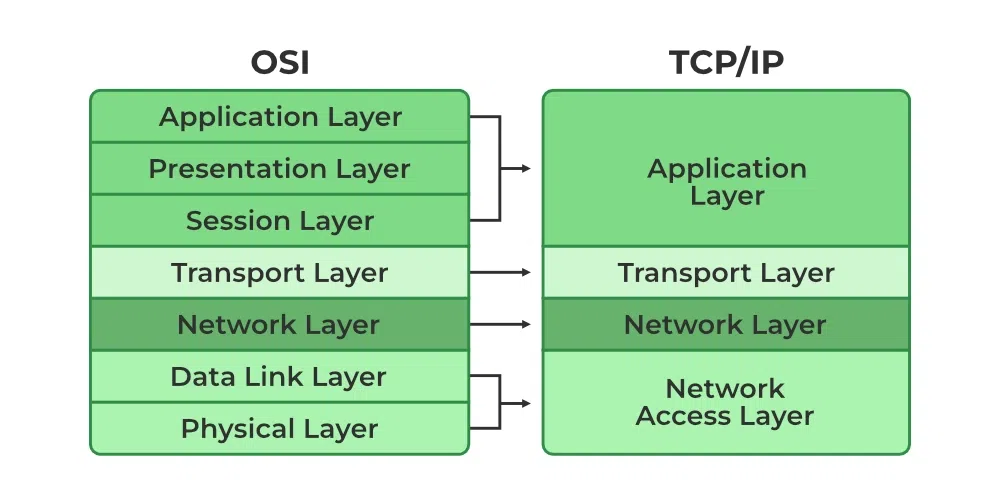
The OSI model (a conceptual model that explains how networking works in layers) has 7 layers, while the TCP/IP model (the practical model used in real systems) has 4 layers.
Each layer has its own role, and data moves through these layers step by step.
Breaking Down the OSI Layers
At first, the layers felt confusing, but once explained, they started making sense.
The application layer is where users interact. Protocols (rules that define how systems communicate) like HTTP, FTP, SSH, and SMTP work here.
The presentation layer handles how data is represented, including encoding (formatting), encryption (securing data), and compression (reducing size).
The session layer manages connections between systems and ensures communication continues properly.
The transport layer is responsible for breaking data into packets (small pieces of data) and ensuring reliable delivery.
The network layer handles routing (deciding the path data should take) using IP addresses (unique identifiers for devices).
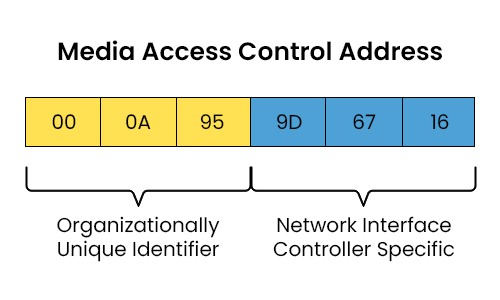
The data link layer works with MAC addresses (unique hardware identifiers of devices) and also adds a header and trailer (extra information before and after data for error detection and delivery).
The physical layer deals with actual transmission. It converts data into electrical signals or wireless signals. It includes mediums like fiber optic cables, twisted pair cables, and wireless communication.
How Data Actually Travels
One important concept was encapsulation.
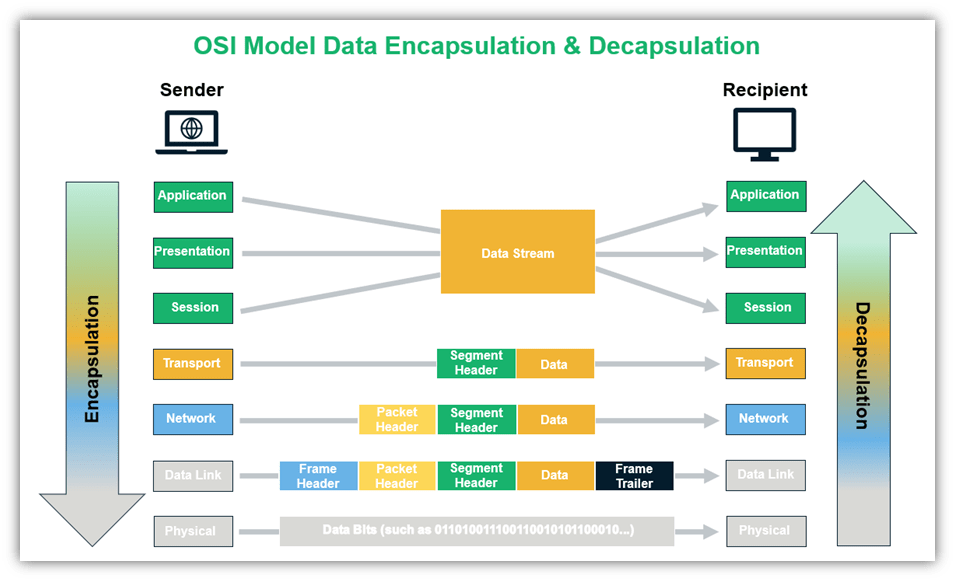
When data is sent, each layer adds its own header (extra information attached to data). At the receiver side, these headers are removed one by one. This process is called encapsulation (adding layers of information) and decapsulation (removing them).
Ports: Identifying Communication
A system can run multiple services at the same time. So how does it know which data belongs to which application?
This is where ports come in.
A port is like a virtual door that directs traffic to a specific service or application.
For example:
- HTTP uses port 80
- SSH uses port 22
There are around 65,535 ports available in a system.
Types of Networks
Networks can be classified based on size and coverage.
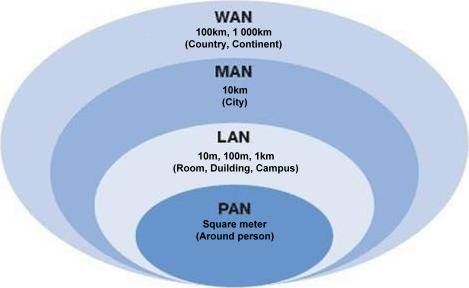
- PAN (Personal Area Network – small network like Bluetooth devices)
- LAN (Local Area Network – within a home or office)
- MAN (Metropolitan Area Network – covers a city)
- WAN (Wide Area Network – covers large areas like countries)
The internet itself is the largest WAN.
Network Topologies
Topology defines how systems are connected.
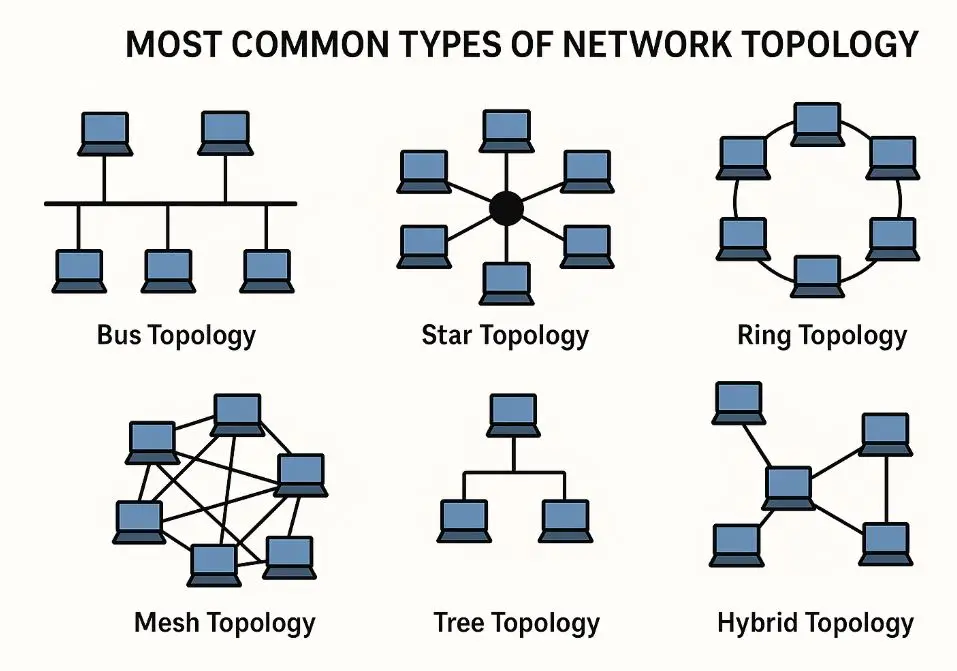
There are types like star, bus, ring, mesh, tree, and hybrid. Each has its own advantages and disadvantages. For example, star topology uses a central device, which makes it easy to manage but creates a single point of failure.
MAC Address and ARP
At the data link layer, every device has a MAC address (a unique hardware identifier assigned to a network interface).
A protocol called ARP (Address Resolution Protocol – used to find MAC address from an IP address) sends a broadcast (message sent to all devices in a network) asking which device owns a specific IP.
Network Address and Broadcast Address
In a network, there are two special addresses:
- Network address (represents the entire network)
- Broadcast address (used to send data to all devices in that network)
These are important for managing communication inside a network.
Understanding IP Addresses
At the network layer, IP addresses are used.
IPv4 provides around 4 billion addresses, which is limited today. IPv6 provides a much larger address space.
Another protocol here is ICMP (Internet Control Message Protocol : used for diagnostics), which is used by tools like ping to check connectivity and response time.
TCP vs UDP
At the transport layer, there are two main protocols.
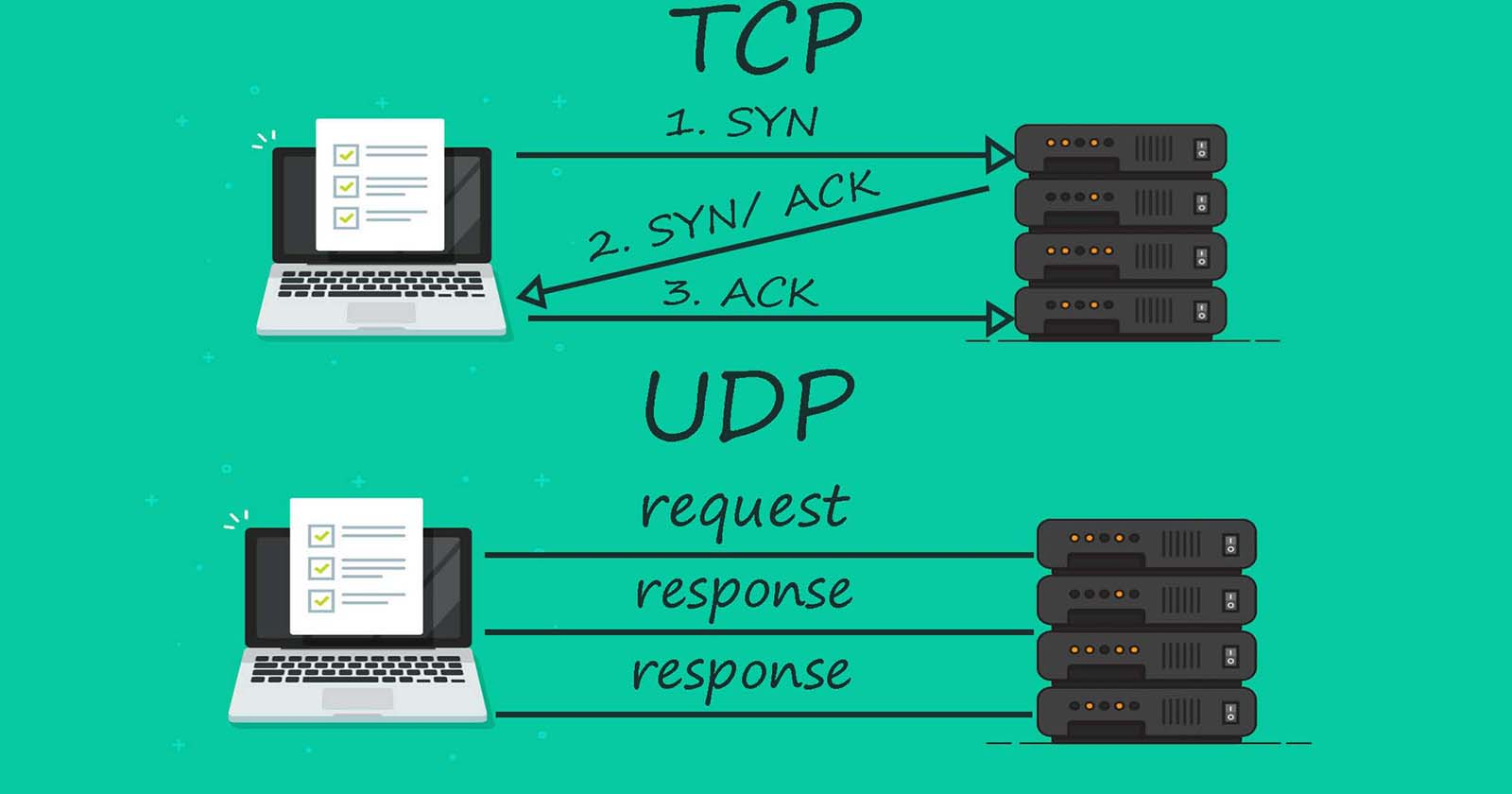
TCP (Transmission Control Protocol – reliable and connection-based) ensures data delivery.
UDP (User Datagram Protocol – fast but unreliable) sends data without guaranteeing delivery.
For example, video streaming or games may use UDP because speed is more important than perfect accuracy.
Networking Devices
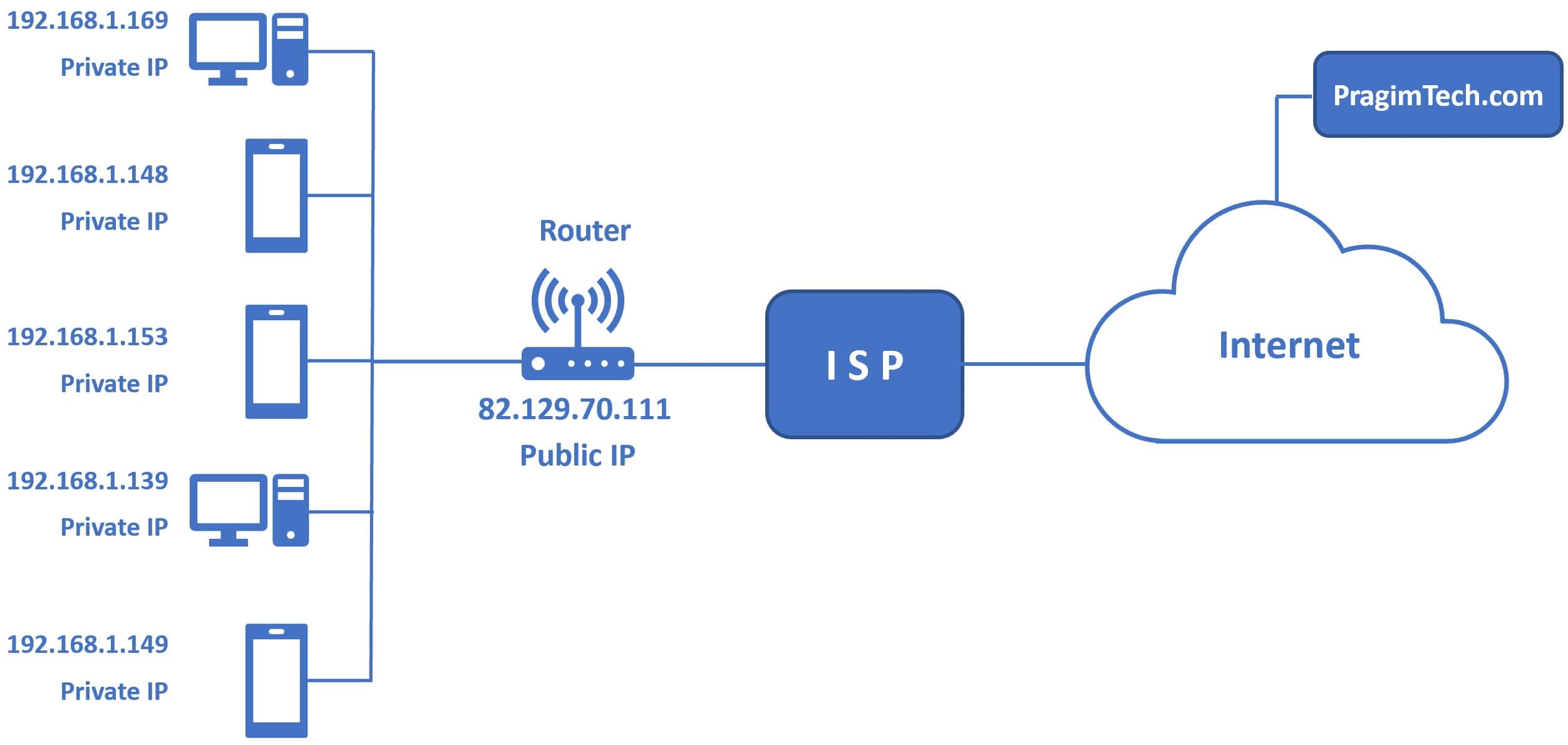
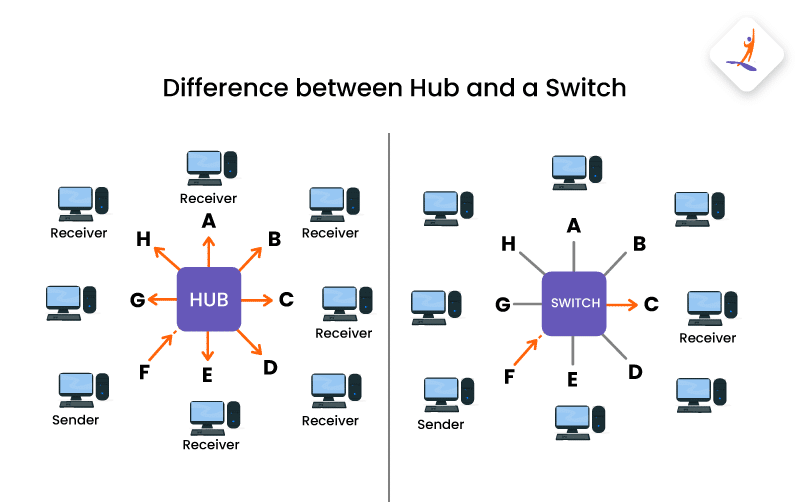
A hub (basic device that sends data to all devices) is simple but inefficient.
A switch (smarter device that sends data only to the correct destination) is more efficient.
A router (device that connects different networks) handles communication between networks.
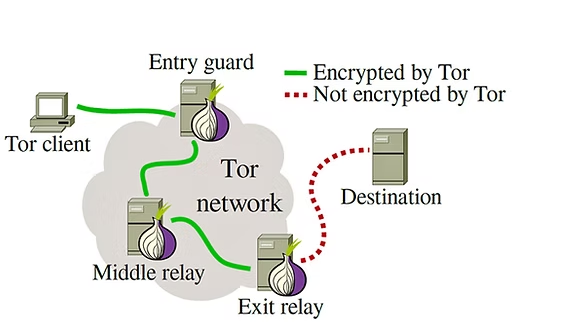
Routers also use NAT (Network Address Translation – method to map multiple private IPs to one public IP).
Proxy and VPN
Another concept discussed was proxy.
A proxy (an intermediary server between user and internet) hides your original IP address from the destination. This is useful for privacy and accessing restricted content.
VPN (Virtual Private Network – creates a secure and private connection over the internet) works in a similar way but also encrypts the data, making it more secure.
DHCP and Subnetting
DHCP (Dynamic Host Configuration Protocol – automatically assigns IP addresses) helps devices connect easily without manual setup.
Subnetting (dividing a large network into smaller networks) improves organization and security.
DNS: How Websites Are Found
DNS (Domain Name System – converts domain names into IP addresses) is one of the most important parts of networking.
When you type a website name:
- The browser checks cache (stored data for faster access)
- It checks the system file like /etc/hosts (a local file that can map domains to IP manually)
- The request goes to a recursive resolver (a server that handles DNS queries)
- It checks ISP cache (internet provider’s stored records)
- Then it goes to root servers (top-level DNS servers)
- Then to TLD servers (like .com, .org domains)
- gTLD (generic domains like .com, .org)
- ccTLD (country-based like .in, .uk)
- Finally, it reaches the authoritative server (which has the actual IP)
The result is stored with a TTL (Time To Live – how long the result is cached before refreshing).
TOR
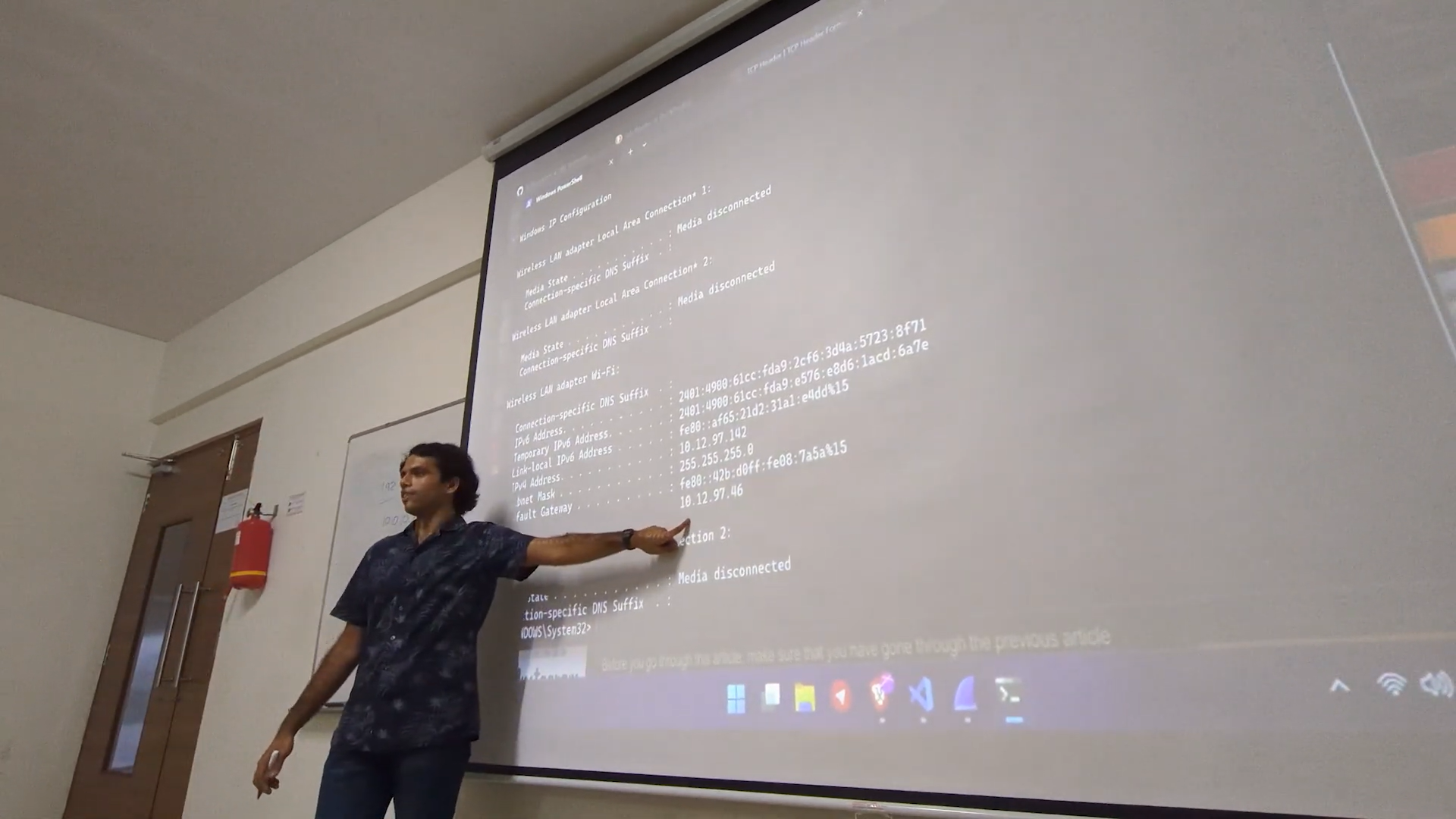
We also got a glimpse of TOR (The Onion Router : a network that hides user identity).
Instead of using a single proxy, TOR routes traffic through multiple nodes (intermediate systems). Each layer adds encryption, like layers of an onion.
Because of this, it becomes very difficult to trace the original sender. This is why journalists and whistleblowers, like Edward Snowden, have used such systems for privacy.
A Common Misconception
One interesting question was about public Wi-Fi.
Many people think all public networks are unsafe. But the actual issue is with HTTP (non-secure communication). If you use HTTPS (encrypted communication), your data is still protected even on public networks.
Tools Used in Networking
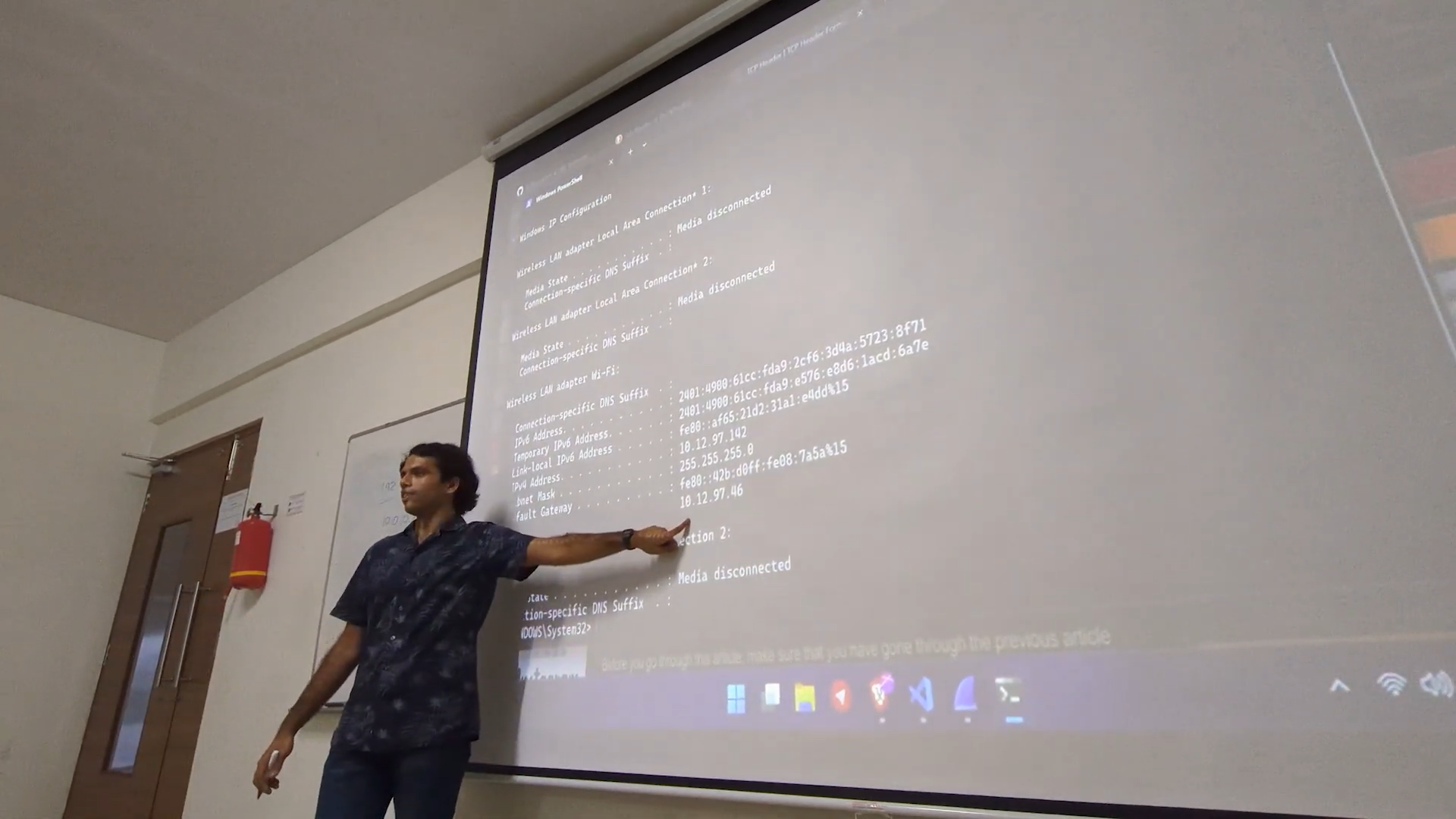
Two important tools were introduced.
Wireshark (a tool used to capture and analyze network traffic) helps in understanding what is happening inside a network.
Nmap (a tool used for scanning ports and detecting services) is widely used in cybersecurity.
Final Thoughts
This session made me realize that networking is not just about connecting systems. It is about understanding how data moves, how it is controlled, and how it is secured.
Pragati Raj also mentioned that networking today is standardized, which helps systems communicate efficiently across the world.
For me, this session connected many concepts together and gave a much clearer picture of how the internet actually works.
If you haven’t read my previous blog on cryptography, check it out here
And yeah, I’m Yugesh, a second year Computer Science and Engineering student specializing in Cybersecurity at DSCE.
Thanks for reading :)